Facebook itself uses user data and behavioral factors to determine which part of the audience should be prioritized for seeing your ad creatives.
Those are the users of the network who have the highest probability of completing the conversion action defined as the goal of your advertising campaign.
At the goal selection stage, three types of goals are available:
- Awareness
- Leads
- Conversions
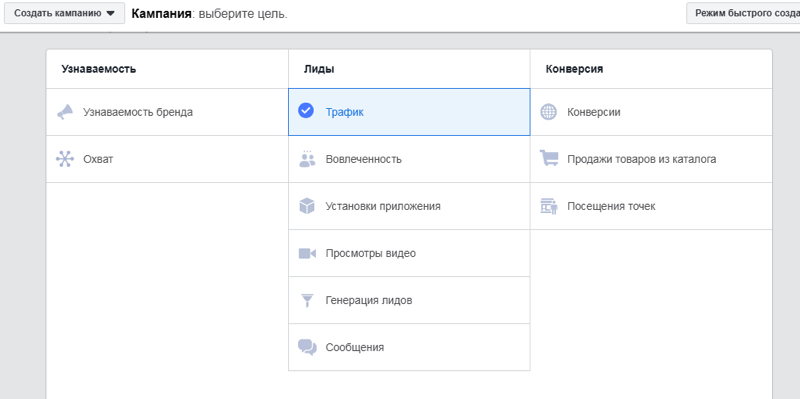
When setting up advertising on Facebook, you can choose from several goal options depending on the purpose of your campaign.
What Is the Essence of the “Conversion” Goal in Facebook Targeted Advertising?
The purpose of this objective is straightforward – to generate a sale of the product or service being advertised. Facebook ads for conversions offer us three variations of conversion-focused campaigns:
- Conversions. This option enables you to optimize Facebook ads for conversions that are directly linked to a sale or another desired action on your website. To implement this, a proper Facebook pixel setup for conversions is required, which we will cover in detail later.
- Catalog Sales Facebook Ads. Before launching such a campaign, it is necessary to create a catalog. You can build the catalog manually or upload a ready-made feed. This helps promote the products placed on your store website.
- Store Visits Facebook Ads. These campaigns are most relevant for businesses that have offline locations of sale. You need to register your store location in the structure of your Facebook page. Once your address is defined, advertising will target users who are located nearby.
Creating a catalog and registering a store can be done in Business Manager, in the “Assets” section.

Optimization for conversions is recommended only if you are receiving at least 50 orders per week. All of these orders must be directly connected to Facebook ads for conversions. External sales not linked to Facebook will not be counted.
Accordingly, if the cost per conversion is around $1–2, your weekly advertising budget will be between $50–100.
The advantage is that the conversion objective on Facebook allows you to immediately determine both the cost and the number of requests. However, if your budget does not allow you to spend the required amounts for this goal, do not set it up. Facebook will not collect enough data for high-quality optimization of Facebook ads for conversions.
In such a situation, it is better first to drive more quality traffic to the store website and only then switch to Facebook ads for conversions.
Choosing the Target Audience
The success of an advertising campaign depends not only on the choice of objective but also on how effectively the target audience is identified. Facebook allows you to configure the audience in detail according to the following strategies:
1. Detailed Targeting Facebook Ads
Think through a detailed portrait of your target audience:
- Age and gender
- Occupation or studies
- Average monthly income
- Marital status (married, with children)
- Geographic data
- Detailed interests (for example, visits to beauty salons or interest in home decoration)

2. Custom Audiences from the Website
When you achieve sufficient website traffic, with the help of Facebook pixel setup for conversions, you can configure remarketing with Facebook pixel to create remarketing audiences for your campaigns.
3. Audience Expansion Facebook Ads
Use audience expansion Facebook ads in combination with detailed targeting to show ads to users who fall outside your preset audience, but who still match your core target criteria.
To ensure effective setup of the audience and to achieve maximum results from your advertising campaign, it is advisable to work with specialists who provide social media promotion services and have experience in creating successful SMM strategies.
With the help of Facebook Pixel, two types of conversion setup are available:
- Page Visits
A page visit means that a user lands on a specific page of your website related to completing a conversion. For example, after submitting a request or making a sale, the user is automatically redirected to a “thank you” page. - Events
If there is no thank-you page after the purchase, then conversions are set up based on events. An event is considered an action, such as clicking on the “Buy” or “Order” buttons.
Installing Facebook Pixel
- First, go to the Ads Manager.
- From the Ads Manager tab, open “Pixels.”
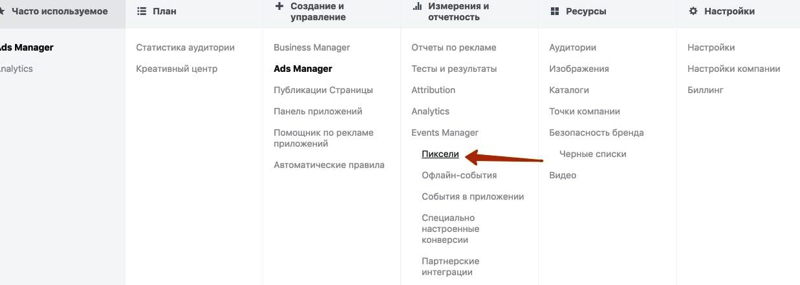
- Click “+ Add New Data Source” and select Facebook Pixel.
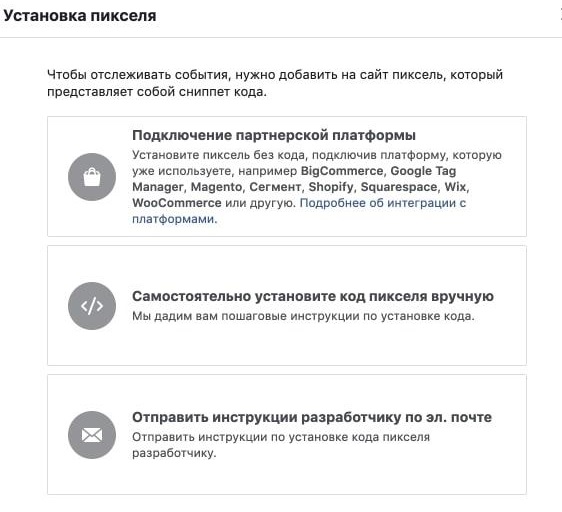
- Continue with the setup according to the instructions, choosing the most convenient installation method:
- via Google Tag Manager container,
- manually,
- with the help of your website developers.
- Install the browser extension Meta Pixel Helper. With its help, you can check whether the installed pixel on the store website works correctly.
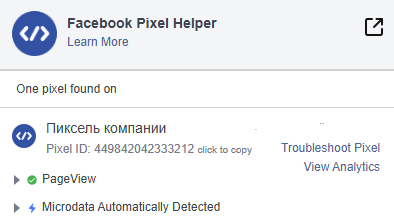
This process is part of proper Facebook pixel setup for conversions, ensuring that your campaign can be optimized for sales, remarketing, and accurate conversion tracking.
Setting Up Conversion Tracking for Page Visits
To configure a conversion for page visits, follow these steps:
- Go again into Ads Manager, and from the tab open “All Tools” → “Custom Conversions.”
- Click “Create Conversion.”
- Set the URL from which you will collect users.
- You need to click on the field “All URL Traffic.” This is located at the top of the form.
- Add the address of the page where the user performs the target action (purchase, order).
- Using a rule, add the page address: “URL = [page name]”.
- Next, from the dropdown list, select the classification of the page and the action that the user performs on it.
- After completing the setup, click “Create.”
- The conversion will be saved and displayed in the “Custom Conversions” section of your Facebook Ads campaign.
Once activated, the conversion will trigger when users of your audience visit the necessary page, and Facebook will begin collecting statistics for Facebook ads for conversions and to optimize facebook ads for conversions.
Setting Up Conversion Tracking for Events
To track button clicks that represent a conversion (for example, “Register” or “Buy”), follow these steps:
- Go to your store website and find the button responsible for the conversion (such as “Register” or “Buy”).
- Right-click the button and select “Inspect” (View Code).
- A console with the page code will open. The button’s code should be highlighted automatically.
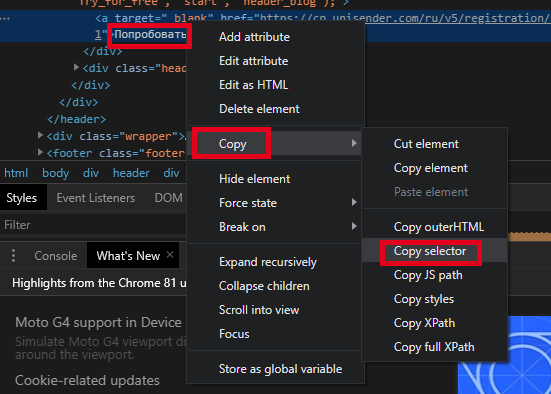
- Right-click the highlighted code, choose “Copy” → “Copy selector.” Save the copied selector in a notepad file.

- In Google Tag Manager, create a Trigger. Click “Create”, select type “Click – All Elements.”
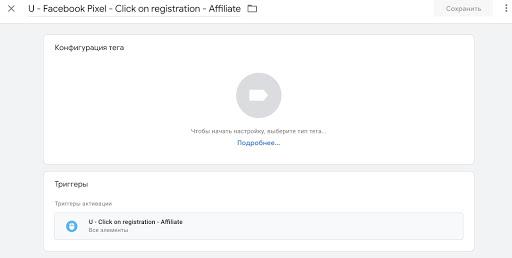
- A form will appear. Choose “Some Clicks” as the condition for activation.
- In the event field, specify Click Element → matches CSS selector, and paste the copied selector code. Save the trigger.
- Now, create a Tag. Give it a name. In the Tag Configuration form, select Custom HTML. For the trigger, select the one you just created.

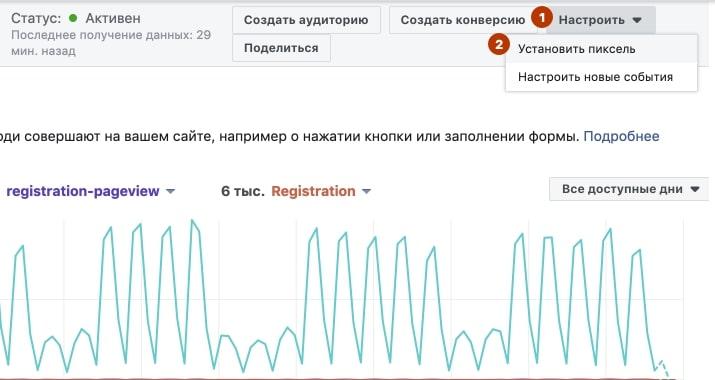
- Insert the Facebook Pixel code into the tag. Before that, modify the pixel setup code so that it distinguishes the specific event that happens on the website. This code can be found in Ads Manager → “Pixels” → “Set up Pixel” → “Manually Install Pixel Code.” Copy the code into a notepad.
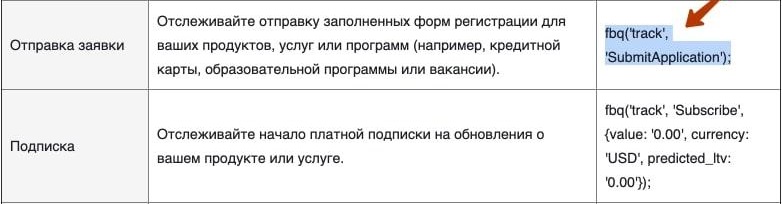
- Add the required event code (e.g., form submission, lead, or sale) into the pixel script. The full list of event codes is available in the official Facebook instructions. Paste the necessary code.
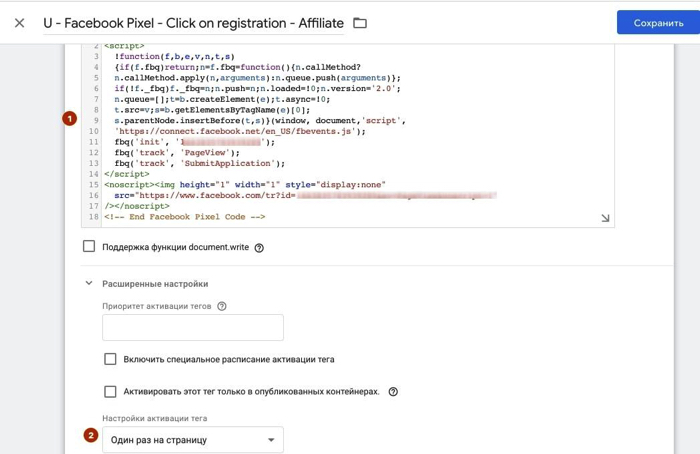
- Open the notepad with the pixel code and insert the copied event code into it. Then return to Google Tag Manager, open the HTML block, and paste the modified pixel code. In the additional settings, select “Once per page.”
Next, test the tag in Preview mode, and then publish the changes. This ensures that the event data is correctly transmitted to Facebook Ads Manager for your advertising campaign.
From now on, your audience’s actions, like button clicks, will be tracked as conversions, enabling you to optimize Facebook ads for conversions, remarketing with Facebook pixel, and better measurement of Facebook ads for conversions.
Considering All the Factors
Taking into account all the factors mentioned above, it is necessary to carefully think through your decision before choosing the objectives of your advertising campaigns on Facebook. If users perform the recommended number of conversions within the specified period, and your budget allows you to use this advertising goal type, then you should definitely apply it.
Facebook, with the help of automated algorithms, will improve the results of your sales. By running facebook ads for conversions, you can increase the effectiveness of your campaigns, track store visits Facebook ads, manage catalog sales Facebook ads, and apply remarketing with Facebook Pixel. Together with detailed targeting Facebook ads and audience expansion facebook ads, this makes it possible to properly optimize facebook ads for conversions and achieve high performance.
If, however, you are not ready for this type of campaign, it is recommended to first develop a strategy for attracting a larger flow of targeted audience visits to your store website, based on the available budget.
You can always contact us and use our professional services for managing targeted advertising campaigns. Get a free consultation from AG.Marketing – specialists are available to answer any questions that interest you regarding Facebook Pixel setup for conversions, audience targeting, or overall Facebook ads for conversions.